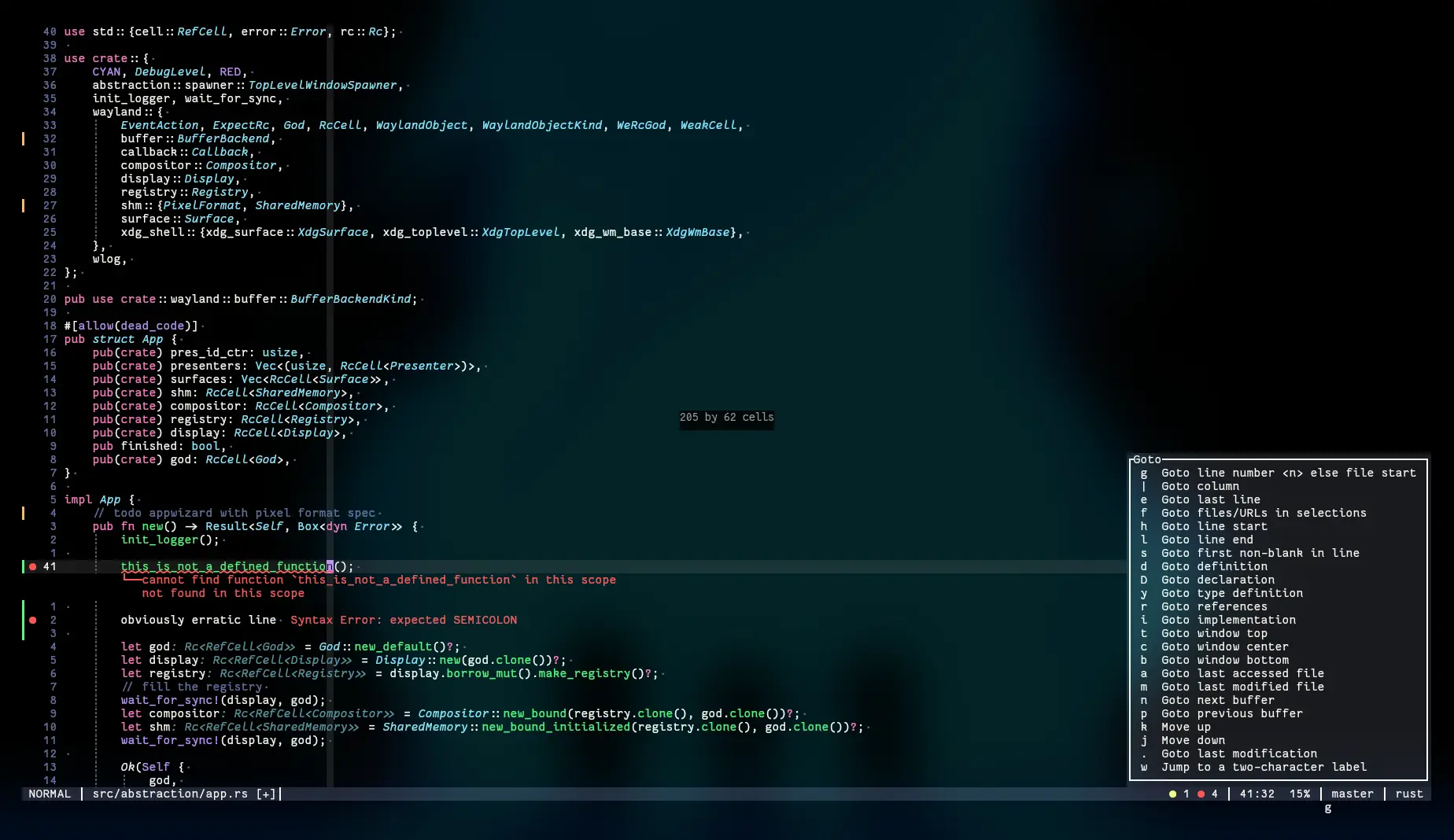
neovim is advertised as a modern alternative to vim (vi improved) and the even older vi (visual). it has a built-in lsp client and claims to be hyperextensible with its lua plugin system. i can't lie, it is a good piece of software. there's a plugin already made for whatever you need and probably a million others. it's not an ide — but you can make it one. this was an awesome premise for me. when you install, it's just a bare text editor with vim motions, but a few hours and 200 lines of config later, you will have grown a fully customized code-editing monster
while i was really pleased with my new programming environment, one thing was always bugging me: it's SO verbose and complicated. you need a plugin manager to install plugins, then you have to pick the plugins, then you have to figure out why the plugins aren't working, then you find out that you can't import some particular plugin in the usual way for some reason. the lsp installing experience is downright fucking horrid. there was an nvim-lspconfig architecture but it is now deprecated in favor of a built-in lsp module, which i could never configure right. this is obviously a skill issue, but why does configuring a text editor involve skill issues? i also don't like lua. this is clearly not for me
i first heard of helix while browsing zacoons' stuff page. i looked at the editor's website, played the introductory video, watched someone select a 9 loc long function by selecting it from top to bottom by hand and replacing a variable name with a substitution instead of using an lsp. then i remarked the ugly background color in my head, read a bit of the faq, and left. i wasn't very impressed. a few days ago i got so fed up with neovim that a neuron in my hippocampus fired off and reminded me of helix's existence, along with the nice menus i saw in the intro video. i quickly installed the package and got greeted by that same ugly purple. thankfully there's a 134 preinstalled themes. wink. ;P
so how is it? awesome!! everything just works. my configuration file's contents can easily fit on my monitor, and most of the options i set are cosmetic. the other file i needed (?) to configure was the languages.toml file, in which you can set per-language options. stuff like auto-pairs, language servers, whether to format on save, what keybinds or lsp options to modify. i also copied the dracula color theme that comes with the editor, made some changes to it, and set kitty up to enable transparency for a few colors
the user experience is good. very good. and all that was needed for me to get adapted was a small introductory doc and the built-in hint boxes that appear when you press some keys, like space, the square brackets [], g or m, and probably others. i have diagnostic displays so pleasant that i get excited to make an error. okay, i lied. but they're sick
the whole shtick of helix is that it's cursor based, which they apparently stole from kakuone – another text which i haven't heard about before. to insert pub(crate) before some struct fields, in neovim i'd go into visual block mode with ctrl-v, then do a 10j to select the first letter of every field, and then I to insert my text before the block. in helix this operation involves adding some cursors below the main one with 10C, then pressing i to insert, and typing whatever i need. there's macros, built-in hop.nvim alternative, treesitter support for jumps, matching, which is really powerful for selecting surrounding objects
sometimes while editing in neovim you websearch to find a way to achieve a seemingly simple goal. then you find out that to close all buffers, save the current one, you need to type in %bd|e#. in helix that's a :bco or a :buffer-close-others – they're aliases. AND you get little explainations while typing the commands! if only someone thought before that i might actually want to know what i'm writing without opening a zillion help pages... i had to look up that vim monstrocity thrice, by the way. the stackoverflow explaination comments didn't really help
another feature, which might seem annoying at fist, is that moving the cursor often automatically selects. when you hit w to go to the end of the current word (do not confuse with a WORD, which only cares about space characters), a selection will be made from the previous position to the end of the word. so what's the big deal? all it takes to change the selection is a c. that's it. if you want the whole word selected, you just go back to the start of the word, then to the end, and then change. or you could use matching, or you could use the other selection methods. there may even be better ways that i do not know of. i find this feature very helpful: sometimes before i even think about selecting a word i want to change, it's already selected
there's more. finding works over multiple lines. every menu with a searchbox is fuzzy. built-in customizable statusline. everything just makes sense. when looking at the weird rules with vim's commands, some of them even look like legacy workarounds to me. and helix has a huge advantage over these vim-based editors: the developers can do whatever they want. they didn't have to add vimscript support, they didn't have to inherit anything from vim
there of course is an elephant in this room. neovim brags about being hyperextensive. there is no plugin system in helix. yet. there is work on it, and there are plugins, but it's not in the master branch
i also got used to the ugly background color in the docs. so that's nice xD